I've been building Flutter apps professionally for years now, and I've seen the backend landscape evolve from Firebase to Supabase to custom Node.js APIs. Each solution came with trade-offs: Firebase locked you in, Supabase was great until you needed custom logic, and maintaining a separate Node.js backend meant context-switching between TypeScript and Dart.
To be honest, I wasn't actively looking for a new backend solution. But Serverpod kept showing up—in my feeds, in Flutter newsletters, in conversations with other developers. The buzz was real.
So I blocked out a weekend to try it. No expectations, no pressure. Just a genuine attempt to see if the hype had any substance. Here's what I found.
Setup: The First Surprise
I expected the usual setup friction: Docker configs, environment variables, database connection strings, authentication middleware. Sure, I could ask Claude or Cursor to help with boilerplate, but even with AI agents speeding things up, getting a backend stack running still means an hour of setup before writing actual business logic.
Instead:
$ serverpod create weekend_experiment
Creating project...
✓ Server setup complete (packages/weekend_experiment_server)
✓ Client library generated (packages/weekend_experiment_client)
✓ Flutter app created (weekend_experiment_flutter)
✓ Database migrations ready
✓ Docker compose configured
The project structure was immediately familiar to any Flutter developer:
weekend_experiment/
├── weekend_experiment_server/     # Backend code
├── weekend_experiment_client/     # Auto-generated API client
├── weekend_experiment_flutter/    # Flutter app
└── docker-compose.yaml            # PostgreSQL + Redis ready
I ran docker compose up in the server directory. PostgreSQL and Redis spun up. Then dart run bin/main.dart --apply-migrations to initialize the database.
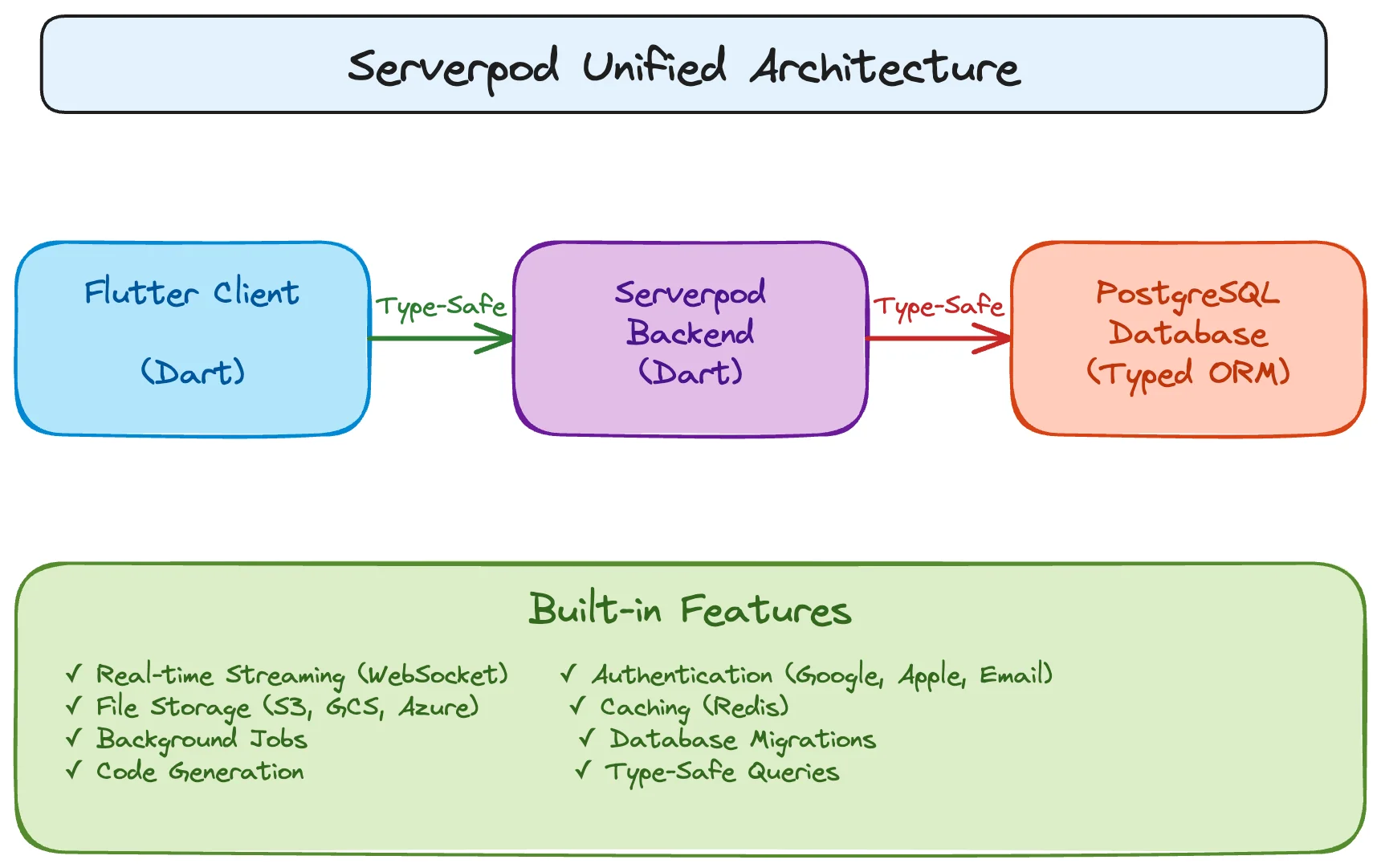
The Good: What Actually Impressed Me
1. The ORM That Doesn't Fight You
I've written enough SQL to know what good database tooling feels like. I've also suffered through ORMs that generate horrific queries and make simple things hard.
I created a model file to test Serverpod's ORM:
# user.spy.yaml
class: User
table: user
fields:
  name: String
  email: String
  age: int?
  premium: bool
  createdAt: DateTime

indexes:
  - fields: email
    unique: true
Ran serverpod generate. The framework generated:
- A Dart class with all fields
- JSON serialization/deserialization
- Database access methods
- Client-side models
- Migration files
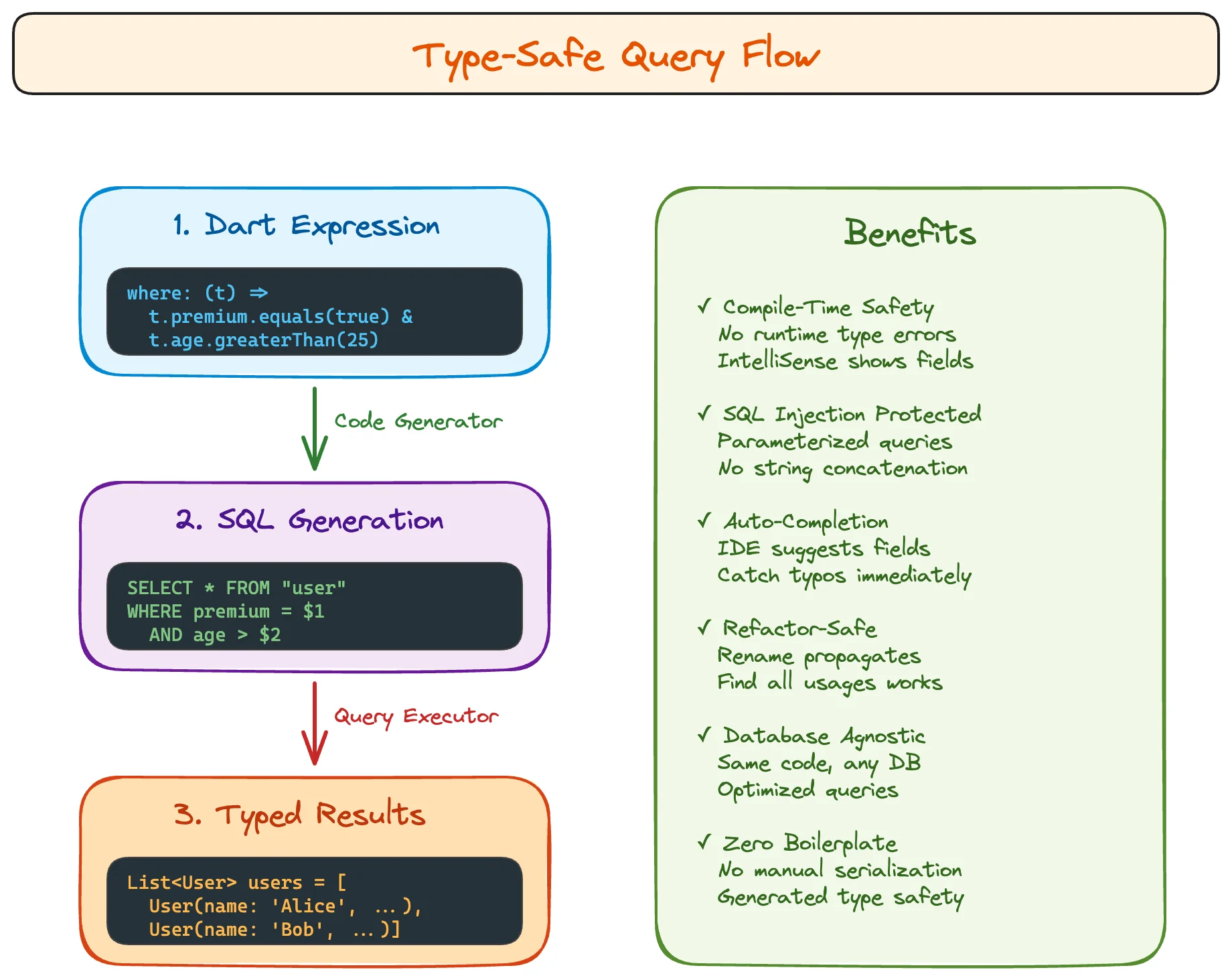
Here's where it got interesting. The query API felt natural:
// Find all premium users over 25, ordered by creation date
final users = await User.db.find(
  session,
  where: (t) => t.premium.equals(true) & t.age.greaterThan(25),
  orderBy: (t) => t.createdAt.desc(),
  limit: 20,
);

// Complex join with relations
final postsWithAuthors = await Post.db.find(
  session,
  where: (t) => t.publishedAt.isNotNull(),
  include: (t) => [t.author, t.comments],
);
Type-safe. No string column names. No SQL injection possible. IntelliSense shows available fields.
I tested it with a deliberately broken query:
where: (t) => t.nonExistentField.equals(true) // Compile error!
The Dart analyzer caught it immediately. No runtime surprises. No debugging production issues caused by typos.
2. Real-Time That Actually Works
Most real-time implementations involve setting up WebSocket servers, handling connections/disconnections, managing subscriptions, dealing with reconnection logic, and synchronizing state.
I wanted to test Serverpod's streaming capabilities with a simple counter.
Server endpoint:
class CounterEndpoint extends Endpoint {
  Stream watchCounter(Session session) async* {
    for (int i = 0; i < 100; i++) {
      await Future.delayed(Duration(seconds: 1));
      yield i;
    }
  }
}
Client usage:
client.counter.watchCounter().listen((count) {
  print('Counter: $count');
});
That's it. Serverpod handles WebSocket connection management, automatic reconnection on network loss, backpressure when the client is slow, and clean stream disposal.
For database-driven real-time updates:
class ChatEndpoint extends Endpoint {
  Stream watchRoom(Session session, int roomId) async* {
    await for (var message in Message.db.watch(
      session,
      where: (t) => t.roomId.equals(roomId),
    )) {
      yield message;
    }
  }
}
Any database change to messages in that room automatically streams to all connected clients. No manual pub/sub setup. No Redis channels. No message queues.
3. Code Generation That Makes Sense
Serverpod's generation is straightforward: models defined in YAML, code generated from your server structure. The output is readable Dart—no magic, no abstractions hiding complexity. When something's wrong, you can actually see what's happening.
$ serverpod generate
Analyzing server...
✓ Found 5 models
✓ Found 3 endpoints
Generating...
✓ Client library (packages/weekend_experiment_client/)
✓ Protocol models
✓ Database migrations

Time: ~5 seconds
4. Authentication Without the Tears
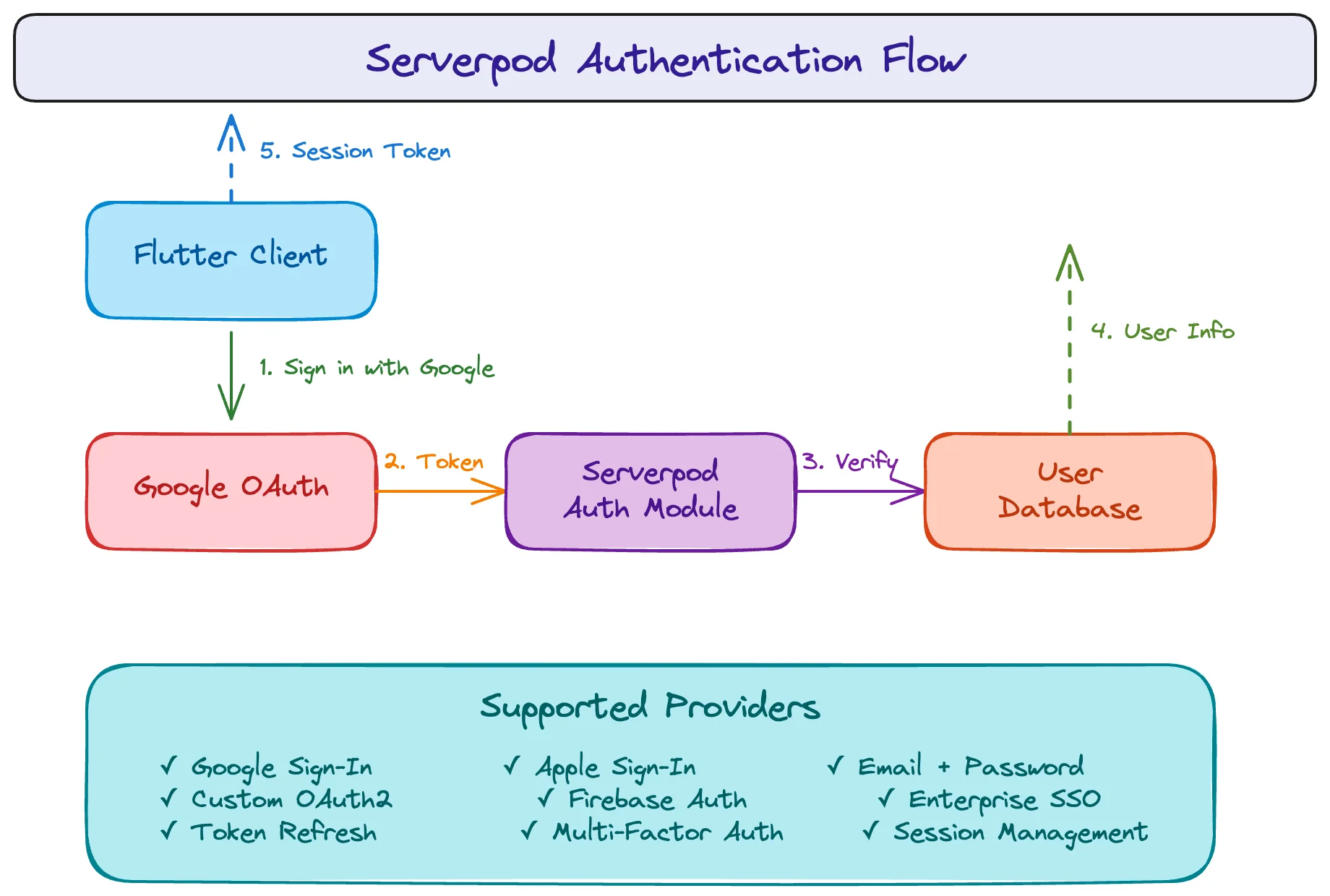
Authentication setup has gotten easier over the years—plenty of libraries handle OAuth flows. But integrating them still means configuration, testing callbacks, and making sure everything works across environments.
Serverpod includes serverpod_auth module with support for Google, Apple, and Email authentication.
Server setup:
import 'package:serverpod_auth/server.dart';

// Authentication is configured through the serverpod_auth package
Client setup:
import 'package:serverpod_auth/client.dart';

// Sign in with Google
final result = await client.auth.signInWithGoogle();
if (result.success) {
  print('Welcome ${result.userInfo.userName}');
}
The session automatically includes authenticated user:
class ProfileEndpoint extends Endpoint {
  Future getMyProfile(Session session) async {
    final userId = session.userId;
    if (userId == null) throw Exception('Not authenticated');

    return await Profile.db.findById(session, userId);
  }
}
No JWT parsing. No middleware chains. No authorization header management.
(Pro tip: If you add Google Sign-In to your iOS app, don't forget Apple Sign-In too, or Apple will happily reject your app.)
5. The Development Experience
This is subtle but important: everything is Dart.
- Server code? Dart.
- Client code? Dart.
- Database models? Dart (via YAML, but feels like Dart).
- Tests? Dart.
- Tooling? Dart CLI.
Writing both client and server in Dart eliminates language context switching. The tooling, patterns, and conventions are consistent across the stack. You can move between frontend and backend work without the cognitive overhead of switching ecosystems.
The Bad: Where It Falls Short
Here's where things weren't perfect.
1. Smaller Package Ecosystem
The third-party package ecosystem is limited compared to Express or Django. While you'll find some community packages (like Stripe integrations), you won't have the same breadth of options. Need a specific CMS integration? Elasticsearch connector? Twilio wrapper? You'll likely be building it yourself or adapting existing Dart packages.
AI coding assistants can help with general Dart patterns, but their Serverpod-specific knowledge is limited. They're useful for standard CRUD operations and basic server patterns, but you'll be reading documentation and source code more than you might with mainstream frameworks.
If your project heavily depends on integrating with specialized services or requires extensive third-party tooling, account for additional implementation time.
2. The Learning Curve for Complex Features
The basics are smooth. Creating endpoints, defining models, simple queries - all intuitive.
Advanced features? The documentation assumes you understand the underlying concepts.
Complex authorization patterns, advanced transaction handling, and intricate database relationships require piecing together solutions from Github issue and AI.
3. Migration Complexity
Database migrations work well for simple changes—adding nullable fields, creating tables. Complex changes require manual intervention:
- Data transformations
- Renaming columns while preserving data
- Splitting tables
- Complex constraint changes
The migration system doesn't automatically handle these scenarios. You can manually edit the generated SQL migrations, but this reduces some of the type-safe ORM benefits and requires careful testing.
4. Production Documentation Gaps
Getting started locally? Perfect.
Deploying to production? The docs cover Docker basics and provide a health check endpoint, but you'll need to figure out the production DevOps details yourself:
- Kubernetes-specific configurations (liveness/readiness probes, HPA)
- Graceful shutdown for zero-downtime deployments
- Database backup and disaster recovery strategies
- Log aggregation and centralized monitoring
- Production-grade security hardening
There's a community serverpod_vps package that helps, and GitHub discussions fill some gaps, but comprehensive production operations guides would be valuable.
5. Performance Data
User testimonials mention Serverpod handling 100,000+ daily requests in production, and there's a community benchmark comparing it to other frameworks. But comprehensive performance documentation is sparse.
- Latency distribution under various loads
- Horizontal scaling patterns
- Memory footprint under load
- Database connection pooling best practices
- Caching strategy guidelines
This makes capacity planning for larger applications more uncertain.
The Surprising: What I Didn't Expect
1. The File Upload System Is Actually Good
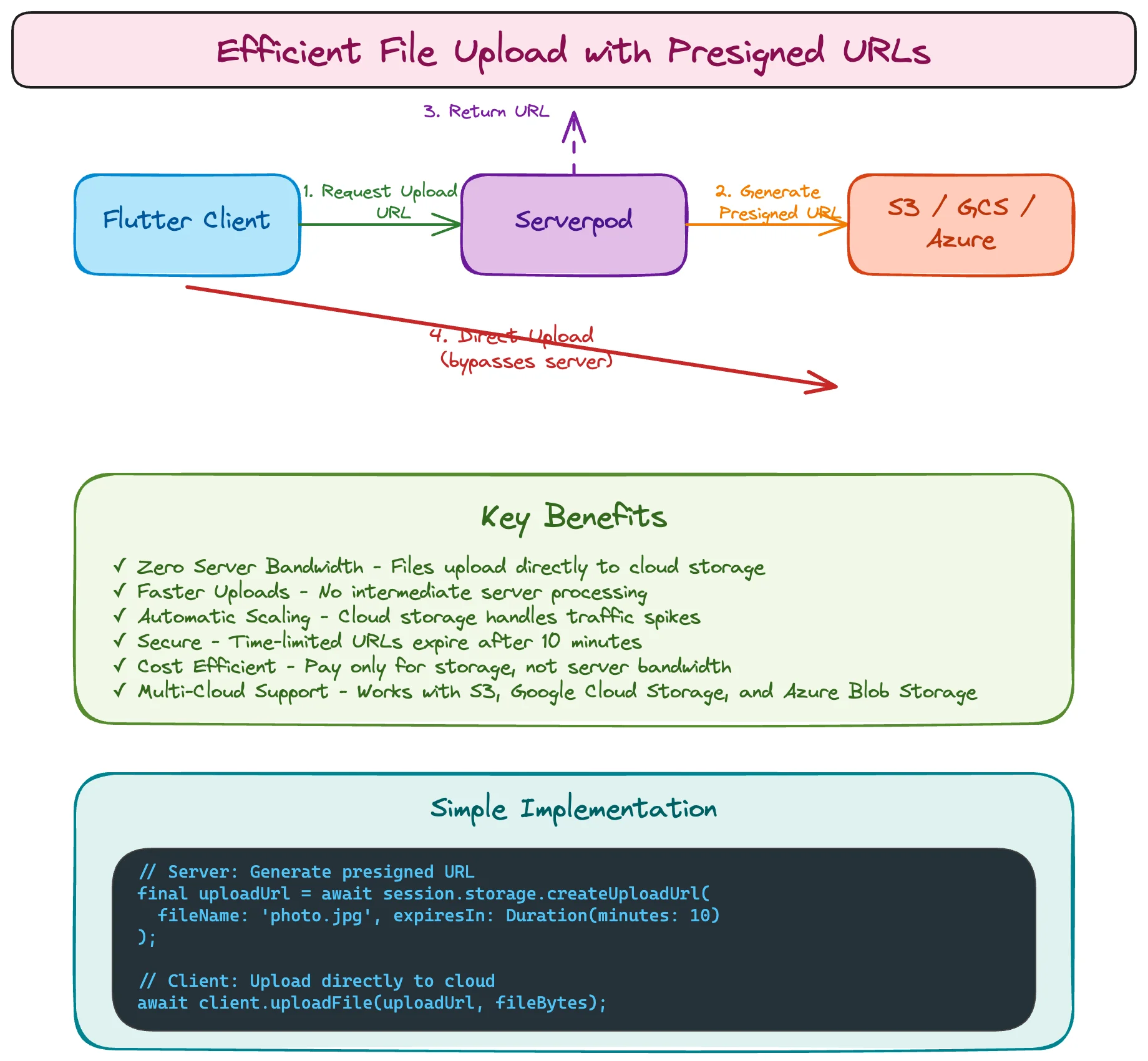
Most file upload implementations are painful. Serverpod surprised me here.
// Server endpoint
class FileEndpoint extends Endpoint {
  Future getUploadDescription(Session session, String fileName) async {
    return await session.storage.createDirectFileUploadDescription(
      storageId: 'public',
      path: fileName,
    );
  }
}

// Client uploads directly to cloud storage
final uploadDescription = await client.file.getUploadDescription('photo.jpg');
await uploader.upload(uploadDescription, fileBytes);
This generates presigned URLs for direct cloud storage uploads. No file data passing through your server. Supports S3 and Google Cloud Storage.
I didn't expect this level of sophistication in a young framework.
2. The Caching Layer Is Built-In
Redis integration isn't bolted on—it's part of the core API:
// Cache user profile
await session.caches.redis.put(
  'profile:$userId',
  profile,
  lifetime: Duration(minutes: 5),
);

// Retrieve from cache
final cached = await session.caches.redis.get('profile:$userId');
Type-safe caching with automatic serialization. The cache is session-scoped, available everywhere without manual dependency injection.
3. Future Calls for Async Background Jobs
I needed to send an email after user registration without blocking the response:
class UserEndpoint extends Endpoint {
  Future register(Session session, User user) async {
    final created = await User.db.insertRow(session, user);

    // Fire and forget - executes in background
    await session.messages.sendFutureCall(
      'email',
      'sendWelcome',
      {'userId': created.id},
      delay: Duration(seconds: 10),
    );

    return created;  // Response sent immediately
  }
}
These "future calls" are persisted to PostgreSQL, survive server restarts, and provide exactly-once execution semantics. No AWS SQS, No RabbitMQ.
This replaced what would normally require a separate message queue infrastructure.
The Verdict: Would I Use It Again?
After a weekend of exploration, here's my honest assessment:
Use Serverpod When:
- Building Flutter-first applications where the entire team works in Dart
- Type safety across the full stack is a priority
- Real-time features are core to the product (chat, collaboration, live updates)
- Development velocity matters more than ecosystem maturity
- The team prefers staying in a single language ecosystem
Consider Alternatives When:
- Third-party integrations are extensive and specialized
- The team spans multiple languages and stacks (Python ML services, Go microservices, etc.)
- Production deployment requires comprehensive operational documentation
- Integration with legacy systems or proprietary APIs is significant
- The project needs proven scalability patterns at massive scale
Conclusion
Serverpod is legitimately impressive for what it is: a modern, full-stack Dart framework that eliminates significant boilerplate while maintaining type safety from client to database. The code generation is clean, the ORM is practical, and real-time features work without managing WebSocket complexity.
The ecosystem is young. Documentation has gaps. You'll write more integration code than with established frameworks. But for Flutter teams building real-time applications, the developer experience is genuinely productive once you're past the initial learning curve.
Would I recommend it to my teams?
Yes, with clear expectations about ecosystem maturity and integration limitations.
Would I choose it over Node.js + Express?
If the team knows Flutter? Absolutely. If they don't? Probably not.
Author

Muhammed Ayimen Abdul Latheef
Lead Engineer
You may also like
What I Thought Was People Management Wasn't People Management at All
This article is the 15th entry in the D-Plus🐬 Development Productivity Community Advent Calendar 2025. Day 14's article is... wait, nobody's there??? I had the opportunity to speak at D-Plus in Osaka back in May with a presentation called Task Management...

Building Backend as a Frontend Developer: Experience with Payload CMS
When I was tasked with implementing a headless CMS to primarily serve a mobile application at scale, I found myself stepping into unfamiliar territory. As a frontend developer, backend development once felt like a daunting mix of database design, API impl...